
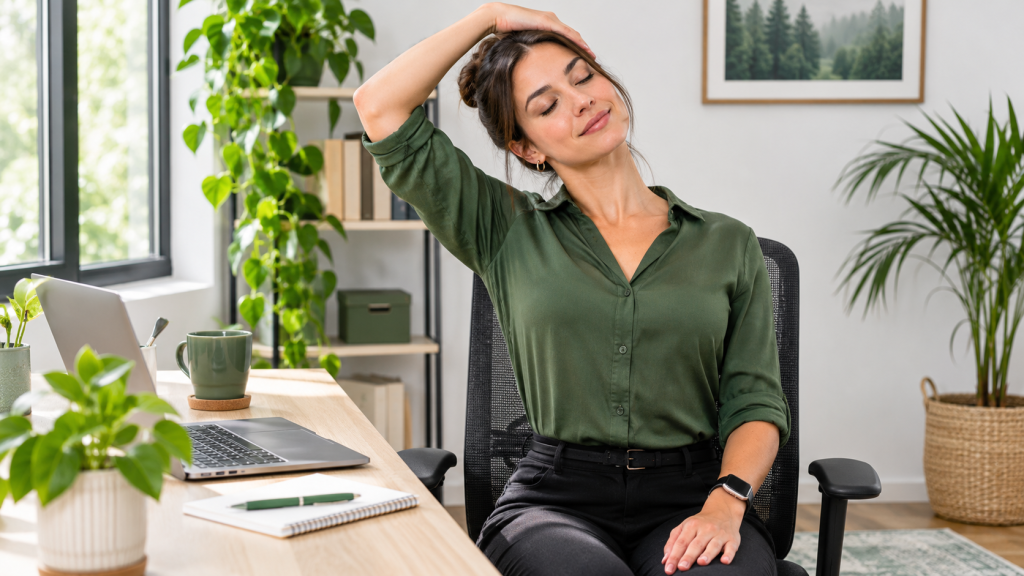
Spending most of your workday at a desk can leave you feeling stiff and uncomfortable. You might notice tight shoulders after several meetings, tired wrists from typing, or hips that feel less comfortable after sitting for hours.
And when your schedule is packed with emails, deadlines, phone calls, and meetings, taking a movement break can easily slip to the bottom of your priorities.
The good news is that you don’t need to change into workout clothes or visit a gym to add more movement to your workday.
A few gentle stretches and mobility exercises can give you an opportunity to change positions, move different parts of your body, and take a short break from your screen.
In this guide, you’ll discover 10 easy desk stretches for office workers, including simple instructions, beginner-friendly modifications, common mistakes, and a practical 10-minute routine.
Whether you work in a corporate office or from home, these movements can help you build a more comfortable and active workday.
Table of Contents
Why Desk Stretches Matter for Office Workers
Office work may not feel physically demanding, but sitting and working at a computer for long periods can place repeated demands on certain muscles and joints.
Think about a typical day.
You may spend hours looking at a screen, using a mouse, typing, and holding your arms in similar positions. Even when you’re sitting comfortably, your body may not get much opportunity to move.
According to the Occupational Safety and Health Administration (OSHA), prolonged computer work and repetitive tasks can contribute to localized fatigue and musculoskeletal discomfort.
OSHA encourages changing positions, taking short breaks, and moving or stretching throughout the workday.
Desk stretches won’t fix every cause of discomfort, and they aren’t a substitute for a suitable workstation or medical treatment. But they can be a practical way to introduce movement into a routine that otherwise involves a lot of sitting.
What Are the Benefits of Taking Movement Breaks?
A short break from your desk gives you an opportunity to:
- Change positions after sitting for a long time.
- Gently move your neck, shoulders, wrists, back, and legs.
- Give muscles involved in repetitive computer tasks a brief rest.
- Become more aware of uncomfortable working positions.
- Step away from your screen and reset your attention.
- Make physical activity a more regular part of your day.
These are practical reasons to take breaks rather than guaranteed medical outcomes.
If you experience persistent pain, numbness, tingling, or weakness, don’t rely on stretching alone. Speak with an appropriate healthcare professional.
Do Desk Stretches Replace Exercise?
No.
Desk stretching is a useful addition to your routine, but gentle movements during a work break usually don’t provide the same cardiovascular or strength-training challenge as a dedicated workout.
The CDC’s physical activity guidelines for adults recommend at least 150 minutes of moderate-intensity aerobic activity each week and muscle-strengthening activities on two or more days.
Walking, cycling, strength training, or other suitable activities can complement desk stretching.
If you’re new to regular physical activity, start with manageable amounts and gradually build up.
Before You Start: Make Your Workspace Safe
Most of the movements in this article require only a sturdy chair and a little room to move.
Before starting, take a moment to check your surroundings.
Move loose objects away from your feet, make sure your chair is stable, and avoid standing on slippery surfaces.
If you’re using a chair with wheels, don’t rely on it for support during standing stretches.
Choose movements that feel comfortable rather than forcing yourself to reach a particular position.
Remember These Basic Stretching Guidelines
- Move slowly and with control.
- Keep breathing naturally.
- Avoid bouncing or jerking.
- Use only a comfortable range of motion.
- Stop if a movement causes pain, dizziness, tingling, or unusual symptoms.
- Reduce or skip movements that don’t suit your abilities.
A mild stretching sensation may be normal, but sharp pain or increasing discomfort isn’t a reason to continue.
People with recent injuries, neck or spinal conditions, significant joint problems, or other health concerns may need individualized guidance before attempting unfamiliar stretches.
10 Easy Desk Stretches for Office Workers
These movements focus on areas that often remain relatively still during desk work.
You don’t need to perform every stretch during every break. Choose the movements that suit your body, workspace, and available time.
1. Gentle Neck Side Stretch
After looking at a computer screen for a long time, you may notice that your neck and shoulders feel uncomfortable.
A gentle neck side stretch can help you explore a comfortable range of movement.
How to do it:
- Sit upright with your feet resting comfortably on the floor.
- Relax your shoulders and look straight ahead.
- Slowly tilt your right ear toward your right shoulder.
- Keep your left shoulder relaxed rather than lifting it.
- Hold the position gently for about 10–15 seconds.
- Return your head to the center.
- Repeat on the opposite side.
Beginner benefit: Encourages gentle movement through the side of the neck.
Common mistake: Pulling the head down with your hand or forcing a deeper stretch.
Beginner modification: Use a smaller movement and hold for only a few seconds.
Safety tip: Avoid this stretch if it causes headaches, dizziness, pain, or symptoms traveling into your arms. Don’t force neck movements.
You should feel comfortable throughout the exercise.
2. Seated Chin Tucks
A chin tuck is a small, controlled neck movement that can help you practice bringing your head back toward a more neutral position.
It’s particularly convenient because you can perform it while sitting at your workstation.
How to do it:
- Sit comfortably with your back supported if possible.
- Look straight ahead.
- Keep your chin level.
- Slowly draw your head backward, as though making a small double chin.
- Avoid tilting your head upward or downward.
- Pause for two or three seconds.
- Return to your starting position.
Beginner starting point: Try 5–8 gentle repetitions.
Beginner benefit: Provides practice with comfortable neck positioning and controlled movement.
Common mistake: Dropping your chin toward your chest instead of moving your head slightly backward.
Beginner modification: Make the movement very small.
Safety tip: Stop if you experience neck pain, dizziness, headache, or unusual symptoms.
This movement should feel subtle. You don’t need to push your head as far backward as possible.
3. Shoulder Rolls
Shoulder rolls are among the easiest movements to perform between meetings.
They require no equipment and can be done while sitting or standing.
How to do it:
- Sit or stand comfortably with your arms relaxed.
- Slowly lift your shoulders slightly upward.
- Move them gently backward.
- Lower them and return to the starting position.
- Repeat several times in a smooth motion.
- If comfortable, reverse the direction.
Beginner starting point: Try 5 rolls in each direction.
Beginner benefit: Encourages gentle shoulder movement after periods of working in one position.
Common mistake: Moving too quickly or raising the shoulders forcefully.
Beginner modification: Make smaller circles and keep the movement relaxed.
Safety tip: Stay within a comfortable range, especially if you have shoulder or neck problems.
Shoulder rolls are more of a mobility movement than a sustained stretch, but they’re a useful addition to a short desk routine.
4. Cross-Body Shoulder Stretch
The cross-body shoulder stretch focuses on the back of the shoulder.
It can be performed while seated, making it convenient for office workers who have limited space.
How to do it:
- Sit or stand upright.
- Bring your right arm gently across the front of your chest.
- Use your left arm to support the right upper arm.
- Keep your shoulders relaxed.
- Hold for approximately 15–20 seconds without pulling forcefully.
- Release and repeat on the opposite side.
Beginner benefit: Provides a gentle stretch around the back of the shoulder.
Common mistake: Pulling the arm too tightly across the body.
Beginner modification: Keep your arm lower and use less pressure.
Safety tip: Avoid positions that cause pinching or pain inside the shoulder joint.
You don’t need to hold the arm perfectly horizontal. Choose an angle that feels comfortable.
5. Seated Chest Opener
Computer work often involves keeping your arms in front of your body for extended periods.
A gentle chest-opening movement provides a chance to change that position.
How to do it:
- Sit near the front of a sturdy chair.
- Place your feet flat on the floor.
- Allow your arms to rest beside your body.
- Gently draw your shoulder blades slightly toward one another.
- Lift your chest a little without arching your lower back excessively.
- Hold for approximately 10 seconds.
- Relax and repeat.
Beginner starting point: Try 3 comfortable repetitions.
Beginner benefit: Encourages a change from the forward-reaching position often used while typing.
Common mistake: Throwing your shoulders backward or arching your back forcefully.
Beginner modification: Perform only a small shoulder-blade movement.
Safety tip: Avoid forcing your arms behind your body if your shoulders feel uncomfortable.
The aim is gentle movement, not maintaining a rigid upright posture all day.
6. 6. Wrist and Forearm Stretch for Computer Users
People who spend long periods typing or using a mouse can include gentle wrist and forearm movements in their regular desk breaks. Keep each movement comfortable and avoid forcing the stretch.
Typing and mouse use involve repeated hand and finger movements.
A gentle wrist and forearm stretch can be a convenient break from those repetitive tasks.
How to do it:
- Sit or stand comfortably.
- Extend your right arm forward with your elbow relaxed.
- Turn your palm upward.
- Gently guide your fingers downward with your opposite hand until you notice a mild stretch along the forearm.
- Hold for about 10 seconds.
- Release and switch arms.
- If comfortable, briefly repeat with your palm facing downward, gently flexing the wrist in the opposite direction.
Beginner benefit: Provides a break from sustained typing and mouse positions.
Common mistake: Pulling the fingers aggressively or locking the elbow.
Beginner modification: Perform gentle wrist movements without using your opposite hand.
Safety tip: If you have wrist pain, tingling, numbness, or a diagnosed wrist condition, don’t force stretching. Seek individualized guidance when appropriate.
Your hands and wrists should return to a comfortable, neutral position when you resume typing.
7. Seated Upper-Back Rotation
Sitting in one position for long periods can make changing posture feel awkward.
A gentle seated rotation gives your upper body an opportunity to move without leaving your chair.
How to do it:
- Sit upright in a sturdy chair with your feet flat on the floor.
- Relax your shoulders.
- Cross your arms loosely over your chest or rest your hands on your shoulders.
- Slowly turn your upper body a small distance to the right.
- Keep your hips facing forward.
- Pause for a few comfortable breaths.
- Return to the center and repeat on the left side.
Beginner benefit: Encourages controlled movement through the upper trunk.
Common mistake: Twisting forcefully or using the chair to pull yourself farther.
Beginner modification: Make the rotation very small.
Safety tip: Skip twisting movements if they aggravate back pain or if a healthcare professional has advised you to avoid spinal rotation.
Your movement should remain comfortable and controlled.
8. Seated Side Bend
A seated side bend can provide a gentle stretch along the side of your torso.
This movement is useful when you need a change of position but can’t leave your desk for long.
How to do it:
- Sit upright with both feet flat on the floor.
- Let your right arm rest beside your body.
- Raise your left arm overhead if that feels comfortable.
- Slowly lean a small distance toward your right side.
- Avoid twisting your body or leaning forward.
- Hold for approximately 10–15 seconds.
- Return upright and switch sides.
Beginner benefit: Encourages gentle movement through the sides of the trunk.
Common mistake: Stretching too far or allowing your upper body to collapse forward.
Beginner modification: Keep both arms low and perform a smaller side bend.
Safety tip: Don’t push into back or shoulder discomfort.
A small, comfortable movement is enough.
9. Seated Figure-Four Hip Stretch
Sitting for long periods keeps your hips in a relatively similar position.
The seated figure-four stretch is one way to gently explore movement around the hip.
How to do it:
- Sit on a sturdy chair with your feet flat on the floor.
- Slowly lift your right foot.
- If comfortable, place your right ankle over your left thigh, above the knee.
- Keep your back in a comfortable position.
- Lean forward slightly from your hips until you notice a gentle stretch around the right hip.
- Hold for about 15–20 seconds.
- Return upright and repeat on the other side.
Beginner benefit: Provides a gentle stretch around the hip and buttock area.
Common mistake: Pressing down forcefully on the raised knee.
Beginner modification: Keep both feet on the floor and gently shift your position instead.
Safety tip: Avoid this position if it causes knee, hip, or back pain. People with certain hip conditions may need an alternative.
Don’t force your ankle into position. This stretch isn’t suitable for every person’s hip mobility.
10. Standing Calf Stretch
Your lower legs also benefit from occasional movement after long periods of sitting.
A gentle calf stretch can be performed near a wall without requiring much space.
How to do it:
- Stand facing a sturdy wall.
- Place your hands against the wall for balance.
- Step your right foot backward a comfortable distance.
- Keep your right heel on the floor and your toes facing forward.
- Slightly bend your front knee.
- Hold a gentle stretch in the back calf for approximately 15–20 seconds.
- Switch legs.
Beginner benefit: Provides gentle stretching through the calf muscles.
Common mistake: Pushing too far forward or lifting the back heel.
Beginner modification: Use a shorter stance.
Safety tip: Avoid this stretch if it causes pain in your Achilles tendon, ankle, knee, or calf.
Make sure your floor isn’t slippery and your wall or support is stable.
A Simple 10-Minute Desk Stretching Routine
Now that you know the individual movements, you can combine them into a practical daily routine.
This example is designed for a short break during your workday. It includes all 10 movements, with approximately one minute allocated to each.
The timings include gentle transitions and short rests. You don’t need to hold every stretch for the entire minute.
Minute 1 — Gentle Neck Side Stretch
- Tilt your head gently toward one shoulder.
- Hold for approximately 10–15 seconds.
- Return to the center.
- Repeat on the opposite side.
- Use the remaining time to relax your shoulders.
Minute 2 — Seated Chin Tucks
- Perform 5–8 small, controlled chin tucks.
- Pause briefly between repetitions.
- Keep breathing normally.
- Avoid forcing the movement.
Minute 3 — Shoulder Rolls
- Roll your shoulders backward five times.
- Reverse direction if comfortable.
- Pause and relax your arms.
- Repeat a few more gentle rolls if desired.
Minute 4 — Cross-Body Shoulder Stretch
- Stretch your right shoulder for approximately 15–20 seconds.
- Release gently.
- Repeat on the left side.
- Use the remaining time to relax your arms.
Minute 5 — Seated Chest Opener
- Sit comfortably upright.
- Gently draw your shoulder blades toward one another.
- Hold for around 10 seconds.
- Relax and repeat two or three times.
Minute 6 — Wrist and Forearm Stretch
- Gently stretch one wrist and forearm.
- Release and switch sides.
- Use a comfortable wrist position without pulling forcefully.
- Shake out your hands lightly if that feels good.
Minute 7 — Seated Upper-Back Rotation
- Turn your upper body slightly to the right.
- Return to the center.
- Repeat on the left.
- Continue with a few slow, comfortable movements.
Minute 8 — Seated Side Bend
- Gently bend toward one side.
- Hold briefly.
- Return upright.
- Switch sides.
- Relax your shoulders before moving on.
Minute 9 — Seated Figure-Four Hip Stretch
- Try the stretch on one side for approximately 15–20 seconds.
- Release slowly.
- Switch sides.
- Skip this movement if your hips or knees feel uncomfortable.
Minute 10 — Standing Calf Stretch
- Stand beside a stable wall.
- Stretch one calf for approximately 15–20 seconds.
- Switch legs.
- Finish by standing comfortably and taking a few normal breaths.
That’s your 10-minute desk stretching routine.
If you have only three or five minutes available, choose the movements that feel most useful and comfortable for you.
Remember: The routine is a suggested movement break, not a treatment for pain or an exercise plan that must be completed exactly.
How Often Should Office Workers Stretch?
There’s no universal stretching schedule that works for every office worker.
Your job, workstation, physical needs, and daily workload all affect how often you can take breaks.
According to OSHA’s guidance on computer workstations, even a well-designed workstation doesn’t eliminate the need to change positions and move throughout the day.
The organization encourages computer users to adjust posture, stretch, stand, and walk periodically.
Try Short Movement Breaks
A practical starting point is to interrupt long periods of uninterrupted sitting when your work allows.
For example, you might stand up after finishing a meeting, walk briefly after completing a task, or take a few minutes to stretch between computer activities.
The Occupational Safety and Health Administration (OSHA) recommends regular short breaks from computer tasks. Its guidance includes taking a five-minute break from computer work each hour to look away, stretch, stand, or walk.
You don’t need to perform the entire 10-minute stretching routine every hour. Even a brief change in position can be a practical part of your workday.
Build Movement Into Your Existing Schedule
Instead of treating stretching as another complicated responsibility, connect movement breaks to activities you already do.
Here are a few examples:
- Before your first meeting: Perform shoulder rolls and gentle neck movements.
- After answering emails: Stand up and walk around for a minute.
- During a lunch break: Take a short walk when possible.
- Between long meetings: Stretch your wrists, shoulders, or upper back.
- Before finishing work: Complete a few comfortable standing stretches.
These small routines may be easier to maintain than expecting yourself to complete a long stretching session every day.
The goal is to make movement a natural part of your work schedule.
Remember That Standing Still Isn’t the Same as Moving
A standing desk can provide opportunities to change positions, but standing in one position for hours isn’t ideal either.
Your body benefits from variety.
Alternate between sitting, standing, walking, and other comfortable movements whenever your job allows.
If you use a standing desk, adjust it to suit your height and avoid spending the entire day standing without changing position.
Simple Workspace Changes That Support Comfort
Stretching is only one part of making desk work more comfortable.
If your monitor is too low, your chair doesn’t support you, or your mouse is difficult to reach, you may continue experiencing discomfort even when you take regular breaks.
Making a few practical workstation adjustments can help reduce unnecessary strain.
1. Position Your Monitor Comfortably
Try to position your monitor directly in front of you so you don’t need to turn your head repeatedly.
OSHA generally recommends keeping the top of the screen at or slightly below eye level.
The ideal setup may vary depending on your vision, monitor size, and whether you wear certain types of glasses.
If you use a laptop for long periods, a separate keyboard and mouse may make it easier to arrange the screen and typing position comfortably.
2. Support Your Back and Feet
Choose a chair that provides reasonable back support.
Adjust your sitting position so your feet can rest comfortably on the floor or on a suitable footrest.
Avoid sitting at the very edge of your chair for long periods if it leaves your back unsupported.
There’s no need to maintain one rigid posture all day. Change positions regularly.
3. Keep Your Keyboard and Mouse Within Easy Reach
Place your keyboard and mouse close enough that you don’t have to stretch your arms forward repeatedly.
Try to keep your shoulders relaxed and your elbows reasonably close to your body.
Your wrists should remain in a comfortable, relatively neutral position when typing.
If your wrist position feels awkward, check your chair height, keyboard placement, and mouse position.
4. Reduce Unnecessary Screen Glare
Bright reflections can make it difficult to see your screen comfortably.
Adjust your monitor angle, room lighting, or window coverings when necessary.
You can also look away from your screen periodically to give your eyes a break from sustained close-up work.
If you experience persistent eye strain, blurred vision, or headaches, consider consulting an eye-care professional.
5. Keep Frequently Used Items Nearby
Place everyday items—such as your mouse, notebook, or phone—within comfortable reach.
This can help you avoid repeatedly twisting or leaning awkwardly.
However, don’t arrange your workspace so efficiently that you never need to stand up.
A short walk to collect water or retrieve something can also provide an opportunity to move.
For more workstation advice, see the OSHA Computer Workstations eTool.
How to Make Desk Stretching a Daily Habit
Knowing a few stretches is useful. Remembering to practice them during a busy workday is often the harder part.
You don’t need an elaborate routine to begin.
Start with a few movements that feel comfortable and find a time when you can perform them consistently.
Begin With Two or Three Stretches
You don’t need to complete all ten movements immediately.
You might start with shoulder rolls, a gentle wrist stretch, and a standing calf stretch.
When those movements become familiar, add another one or two.
A manageable routine is easier to repeat than a plan that feels overwhelming.
Use Natural Reminders
You could connect a short movement break to the end of a meeting or the completion of a task.
If reminders are helpful, use your phone or calendar to prompt you to change positions.
Keep the reminders flexible enough to accommodate your actual workload.
Keep the Routine Comfortable
A stretch doesn’t need to feel intense to be worthwhile.
Move gently, breathe normally, and avoid forcing your joints into difficult positions.
If a movement repeatedly causes discomfort, leave it out and consider whether professional guidance would help.
Make Room for Busy Days
Some days won’t allow a full 10-minute break.
You may have back-to-back meetings, urgent assignments, or unexpected responsibilities.
On those days, choose a shorter routine.
A minute of comfortable movement is still an opportunity to interrupt prolonged sitting.
Combine Stretching With Other Physical Activities
Desk stretches can complement walking, strength training, yoga, or another activity you enjoy.
For example, you might use desk stretches during work and take a comfortable walk afterward.
Our 15-Minute Walking Routine for Beginners offers a simple way to include more movement outside your desk routine.
The aim isn’t to exercise constantly. It’s to develop a practical balance between work, rest, and movement.
Common Desk Stretching Mistakes to Avoid
Even gentle movements can become uncomfortable when performed incorrectly.
Here are several common mistakes to watch for.
Stretching Too Forcefully
It’s easy to assume that a deeper stretch must be more effective.
But pulling your neck, shoulders, wrists, or legs into uncomfortable positions isn’t necessary.
Use a gentle range of motion and stop before the movement becomes painful.
Holding Your Breath
Some people unintentionally hold their breath while stretching.
Try to breathe naturally throughout each movement.
You don’t need to practice complicated breathing techniques or force unusually deep breaths.
Moving Too Quickly
Rushing through stretches can make it harder to notice your body position.
Slow, controlled movements give you more time to adjust.
If you’re short on time, perform fewer stretches rather than rushing through all ten.
Using an Unstable Chair
Office chairs with wheels can move unexpectedly.
Avoid using them as support for standing exercises.
When you need support, choose a stable wall or another secure surface.
Ignoring Persistent Discomfort
Stretching should not be used to push through ongoing pain, numbness, tingling, or weakness.
These symptoms may have causes that require assessment rather than additional stretching.
If symptoms persist, worsen, or interfere with everyday activities, seek appropriate healthcare guidance.
Expecting Stretching to Fix a Poor Workstation
If your chair, desk, monitor, or keyboard placement forces you into uncomfortable positions, stretching alone may not solve the problem.
Review your workstation setup along with your movement habits.
You may also be able to ask your employer about an ergonomic workstation assessment.
When Should You Seek Professional Advice?
Occasional stiffness after a long day is different from persistent or worsening pain.
Desk stretches are intended as general movement breaks, not treatment for medical conditions.
Consider speaking with a qualified healthcare professional if you experience:
- Persistent or worsening neck, shoulder, wrist, or back pain.
- Repeated numbness or tingling in your hands or arms.
- Weakness or difficulty gripping objects.
- Discomfort that interferes with sleep or daily activities.
- Symptoms that continue despite changing your working habits.
Stop exercising and seek urgent medical attention for serious symptoms such as chest pain, fainting, or sudden weakness.
A healthcare professional may recommend an examination, specific exercises, physical therapy, or other treatment based on your situation.
For workplace-related problems, you may also benefit from discussing your workstation setup with an occupational health or ergonomics professional.
Frequently Asked Questions About Desk Stretches for Office Workers
1. What Are the Best Desk Stretches for Office Workers?
The most useful stretches depend on your comfort, work activities, and individual needs.
Gentle neck movements, shoulder rolls, wrist stretches, upper-back rotations, and calf stretches are practical options for many desk workers.
Choose movements that feel comfortable and don’t cause pain.
You don’t need to perform every stretch during every break.
2. How Often Should I Stretch While Working at a Desk?
There isn’t one stretching frequency that’s ideal for everyone.
OSHA recommends incorporating short breaks, changes in position, and movement into prolonged computer work. Its guidance includes five-minute breaks from computer tasks each hour.
You can start by taking brief movement breaks when your schedule allows and adjusting the frequency based on your work and comfort.
3. Is a 10-Minute Desk Stretching Routine Enough?
A 10-minute stretching session can be a practical way to introduce movement into a busy workday.
However, it doesn’t replace the aerobic and muscle-strengthening activity recommended for overall health.
Try combining desk stretches with comfortable walking, strength training, or other suitable forms of physical activity.
4. Can Desk Stretches Help With Neck and Shoulder Stiffness?
Gentle movement may provide a comfortable change from prolonged sitting or computer work.
However, the cause of neck and shoulder discomfort varies.
Stretching isn’t a guaranteed treatment, and certain movements may aggravate specific conditions.
If stiffness is persistent, painful, or accompanied by other symptoms, seek professional guidance.
5. Can I Do Desk Stretches Without Leaving My Chair?
Yes. Several exercises in this guide can be performed while seated.
Examples include gentle neck side stretches, shoulder rolls, wrist stretches, and seated upper-back rotations.
Make sure your chair is stable and your feet are supported.
You can also include standing and walking breaks when your circumstances allow.
6. Do I Need Special Equipment for Desk Stretching?
No. Most beginner-friendly desk stretches require little or no equipment.
A sturdy chair, clear floor space, and a stable wall may be enough.
You don’t need to purchase resistance bands, special stretching tools, or other fitness products simply to begin moving more during your workday.
7. Can Desk Stretching Improve My Posture?
Stretching can help you practice moving into different positions and become more aware of how you’re sitting or working.
However, posture is influenced by many factors, including your workstation setup, physical abilities, and how long you remain in one position.
There is no single perfect sitting position that everyone must maintain all day.
A comfortable workstation and regular changes in position are generally more practical than trying to hold your body rigidly upright.
8. Are Desk Stretches Suitable for People Who Work From Home?
Yes. Many of these movements can be performed in a home office.
Before starting, check that you have enough space and that your chair and other supports are stable.
If your home workspace is temporary, pay particular attention to your screen height, keyboard placement, and chair support.
Working from home doesn’t eliminate the need for movement breaks.
9. Should I Stretch if I Already Have Back or Neck Pain?
It depends on the cause and severity of your symptoms.
Some gentle movements may be appropriate, while others could aggravate a particular condition.
Avoid forcing stretches or assuming that general online exercises are suitable for your situation.
If you have persistent pain, an injury, or a diagnosed spinal condition, seek individualized guidance from a qualified healthcare professional.
10. What Is the Easiest Way to Remember Desk Stretches?
Connect a short movement break to a familiar activity.
For example, you could perform shoulder rolls after a meeting, stretch your wrists after a typing session, or stand up when you finish an assignment.
Choose a reminder that works with your schedule.
Consistency is easier when your routine doesn’t feel like another demanding task.
Final Thoughts: Make Movement Part of Your Workday
A busy office schedule can make it easy to spend hours in one position.
But building a more active workday doesn’t require complicated workouts or expensive equipment.
A gentle neck movement, a few shoulder rolls, or a short walk away from your desk can be a practical way to interrupt prolonged sitting.
Start with two or three stretches that feel comfortable.
As you become familiar with them, you can try the complete 10-minute routine or create your own shorter version.
Remember that desk stretches are one part of a broader approach to well-being. A comfortable workstation, regular movement, appropriate physical activity, and adequate rest all matter.
The goal isn’t perfect posture or a rigid stretching schedule.
It’s finding small, realistic ways to move more comfortably throughout your day.
Explore More Fitness and Wellness Ideas
If you’d like to build more movement into your daily routine, explore these Nourish & Trim Hub guides:
- 15-Minute Walking Routine for Beginners — a practical walking routine for people getting started with regular movement.
- Beginner Strength Training at Home — eight simple exercises that introduce bodyweight strength training.
- Yoga for Beginners at Home — ten beginner-friendly poses and a gentle 15-minute routine.
- How to Build a Better Sleep Routine — realistic habits to support a consistent sleep schedule.
- 7 Simple Healthy Habits You Can Start Today — everyday ideas for building sustainable wellness habits.
You can also get our Free 7-Day Healthy Habits Starter Guide for practical ideas involving movement, food, hydration, and general well-being.
You don’t have to change everything at once. Start with one manageable habit, make it part of your routine, and build from there.
Disclaimer: This article provides general fitness and workplace wellness information and is not intended to diagnose, treat, or prevent medical conditions. Desk stretches may not be suitable for everyone. If you experience persistent pain, numbness, weakness, or have an existing injury or health condition, seek guidance from a qualified healthcare professional before attempting unfamiliar movements.